Features
Your AI Co-Producer
Every tool a producer needs to go from idea to MIDI, powered by AI and guided by music theory.
Melodic
Drums
01 · Conversation
Describe. Refine. Switch Models.
Aether's primary surface is a chat. Plain-language prompts in English or your own language, multi-turn refinement, and drop-in MIDI references, with the freedom to change AI providers mid-session without losing what you've built.
Plain-language prompts: describe chord progressions, basslines, melodies, or full arrangements
Multi-turn refinement: the AI remembers the session so follow-up edits stay coherent
Compose in layers: ask for "a horns section" or "an ostinato under the piano" and the new named, instrument-tagged layer lands alongside what you already have, never replacing it
Drop up to three MIDI files into the chat to blend, remix, or extend them. A multi-track file keeps its parts named and still counts as one, so a four-part arrangement does not use up three slots.
Your Own Language
Prompt it in your language. It answers in your language.
Name a genre or a drum style in French, German, Japanese, Korean, Chinese or most other languages and Aether routes it to the same musical guidance as the English name, then writes its composition plan back in the language you used. What it generates is unaffected: key, scale and drum piece names stay in their standard form, so the notes land where they should. Coverage varies by language; where a name is missing, the Genre and Style menus still get you there.
Melodic · Français · 1/10
“écris-moi une progression de musique classique au piano, quelque chose de mélancolique en la mineur”Classical
Drums · 한국어 · 1/4
“레게 드럼 만들어줘”Reggae
Provider Handoff
Switch models mid-session without losing context.
Start a melody on one provider, swap to another to add a bassline and chords, refine on a third. Aether carries your full conversation forward every time you switch, so the new model picks up exactly where the last left off: key, tempo, feel, and everything you've already generated stay intact. Change the brain without losing the thread.
02 · Smart Controls
Constrain the Generation
Two parameter panels: one for fresh generations, one for editing existing MIDI. Dial in the musical frame or leave it to the AI.
12
Keys
10
Scales
16
Genres
13
Moods
6
Time Sigs
From Pop and R&B to Cinematic, Trap, Bossa Nova, and House. Moods span Happy, Dreamy, Tense, Melancholic, Triumphant, and more.
03 · Structure
Say Where the Drop Goes
Name the sections, give each one a bar count, and Aether writes to that plan instead of guessing at a shape. The presets follow whichever genre you picked.
Per-section bars: add as many sections as the arrangement needs, each with its own bar count, and a running total keeps the sum in view as you type
Genre-aware presets: choose Electronic and the rows offer Intro, Build, Drop, Breakdown, Build 2, Drop 2, Outro. Choose Jazz and they become Head, Solo, Trade, Out-head. Eight of the sixteen genres carry their own list; the rest fall back to Intro, Verse, Chorus, Bridge, Outro.
Leave any of it to the AI: a section left on Auto hands its allocation back to the model, so you can pin the intro at 4 and the build at 12 and let the drop fall where it wants
The plan persists: your sections are saved with the session and come back when you reopen the project
Electronic
Pop
04 · The Engine
Between Send and Notes
What actually happens after you hit send. Genre-aware prompt assembly, optional two-pass planning, batch variations, and 9 AI providers whose model lists you can refresh at any time.
16 genre modules: each with its own creative philosophy; keyword-weighted detection picks the right one automatically
Pro Mode: optional two-pass generation. Stage 1 plans the arrangement, Stage 2 generates MIDI matching that plan. You watch the plan arrive (intent, groove, hook, sections) and it collapses to a "Thought for 12s" card you can reopen. Falls back to single-pass automatically if planning fails.
Batch generation: explore 2 to 5 variations from one prompt. Pick the keeper, save the rest to the library.
9 AI providers, every model list pulled from the provider itself; BYOK for cloud, zero keys for Ollama + LM Studio
Structured output where the API supports it; a resilient parser auto-repairs the rest
Run fully private with local providers. No API key required.
Always Current
A model released tomorrow works today.
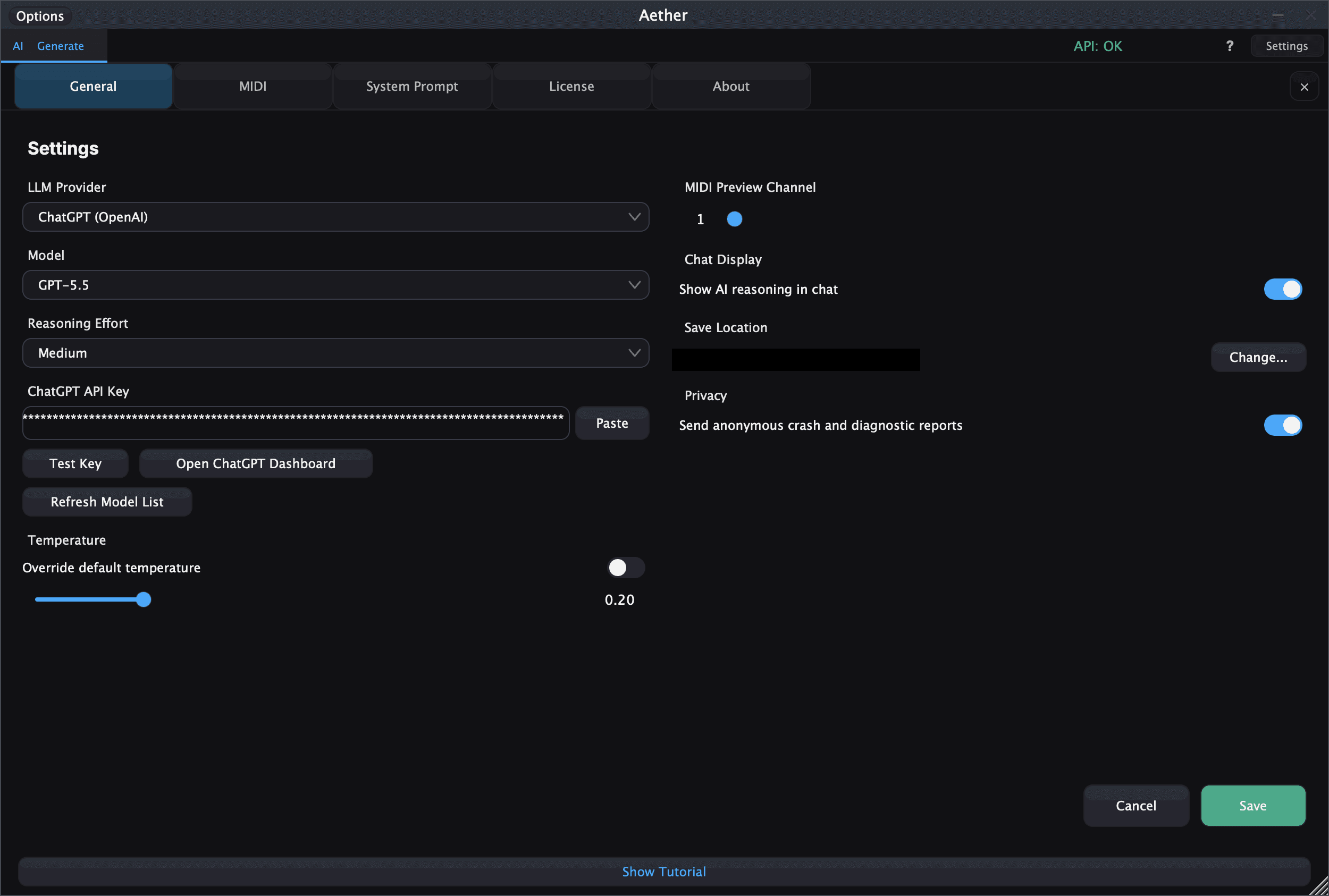
Hit Refresh Model List and Aether asks the provider what it is serving right now, then remembers the answer. Ollama and LM Studio get the same button for whatever your own machine reports. No waiting on a plugin update to see a model that shipped this morning.
Two things keep it honest underneath. New model families are matched by pattern rather than by a hard-coded list, so a fresh generation appears on its own instead of going missing from the menu with nothing to explain why. And a new model is assumed to support its controls, like reasoning effort, correcting itself only if the provider says otherwise. The alternative is a control that quietly vanishes every time a lab ships.
05 · Playback & Refinement
See It. Hear It. Polish It.
Every generation lands in a dual-mode piano roll with instant playback, chord detection, and a configurable post-processing pipeline you can A/B against the raw output.
Dual-mode piano roll: Ableton-horizontal or Synthesia-vertical, one-click toggle
Chord detection overlay: 28 templates with inversions, slash notation, extended chords through 13ths
Built-in piano playback: the Headroom Piano through the sfizz SFZ engine; hear results instantly with no audio plugin on the track
Raw / Clean / Enhance pipeline: Raw is the AI's untouched output, Clean applies safety fixes only, and Enhance layers in quantization, humanization, velocity shaping, and optional dissonance correction. Hot-swap modes mid-playback for instant A/B.
Layers view: a dedicated panel lists every layer with its instrument, a mini piano-roll preview, and per-layer Solo / Mute, plus the clip's detected key, tempo, and layer count
Per-layer colors: every layer gets its own color in the piano roll so overlapping parts stay readable
Per-layer MIDI channel: every layer carries its own channel, 1 to 16, for the moment you drag it into the DAW. A pad, an ostinato and a horn section can each land somewhere deliberate.
BPM override: change tempo post-generation without re-generating
06 · Memory
Nothing Is Ever Lost
Every generation auto-saves with full metadata. Live MIDI capture turns your controller or DAW routing into a source the AI can riff on.
Auto-save: every generation stored as .mid with full metadata (key, scale, BPM, prompt)
Versioned, not scattered: refining a generation in a chat adds a new version to the same entry instead of a new clip, so one idea stays together. Expand any entry to browse its version history and reload an earlier take.
Stars, favorites, tags, search: organize the way you work
Per-clip actions: Preview, Load, Send to Chat, Generate Variation, Reveal in Finder, Delete, inline rename
Live MIDI capture: record from a controller or DAW routing with auto-analysis (key, chord, texture, density, rhythm). Send captured clips straight into the chat as context.
07 · Workflow
Built Around How You Work
DAW-native drag-out, host sync, custom system prompts, and the keyboard-driven pace a session needs.
Drag-to-DAW: drop the rendered MIDI directly into Ableton Live, Logic Pro, FL Studio, Pro Tools, Cubase, Reaper, Fender Studio Pro (formerly Studio One), Bitwig, and more
Named multi-track export: every layer exports as its own named track, with General MIDI program changes available as a setting; drag the whole arrangement or a single layer
Lock to Host: sync BPM and time signature from the DAW in real time
Custom system prompts: teach Aether your house sound; appended to the built-in engine, never overrides safety rules. Melodic and Drums choose separately from one shared library
10-level undo/redo with full state restoration (Cmd+Z / Cmd+Shift+Z)
Per-provider temperature: pin a fixed creativity value for any provider to dial in consistent behavior
08 · Trust
Your Keys, Your Machine
Aether is bring-your-own-key, so where those keys live and where the traffic goes is worth stating plainly.
Keys go to the OS keychain: the macOS Keychain or Windows Credential Manager, not a plaintext config file sitting in your plugin folder
HTTPS only, to a fixed list: every request is checked against a built-in allowlist of provider domains before it leaves. Anything not on the list does not go out, whatever asked for it.
Local means local: run Ollama or LM Studio and your prompts and MIDI never leave the machine. No key, no account, no round trip.
You pay the provider directly: your key, your billing, your rate limits. Aether never proxies your generations through us.
Get Started
Ready to Create?
macOS · Windows
Get Aether, $60One-time purchase · No subscription required